Posts

Showing posts with the label Lucky Patcher

Installation of Lucky Patcher App

First of all  click Here  and download the latest version... after downloading complete extract the app (app not in APK this is in zip file you can download ES File Explorer by clicking Here ) 1. Extract this zip file 2. Install the app 3. Now open app and tap on upper right corner's button 4. Then click on "Download custom patch" 

Lucky Patcher

Lucky Patcher  is one of the most app in these days.... It works with root and non root(not 100% success guaranty in non root method) Because,         Lucky patcher for Android is an important tool which allow a user to patch Android apps. Lucky patcher will find your luck to remove boring ads from apps. You can also remove license verification or in app purchase verification easily with that app. Unwanted app permissions can also be removed with lucky patcher. The app can uninstall stock or system app (only for rooted device) and backup installed apps and games. Lucky Patcher's Features : Very easy to use. Lucky patcher will show you all the apps installed in your device. If Google ads found will be showed on the list. Then you can select your desired app and patch it from the menu. Select the app that you want to patch and just choose options. Ads can be easily removed with lucky patcher from most of the apps and games. See how to blo...
Google Ads Removing From Android Apps

Image
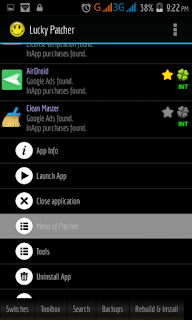
 Remove Google Ads Some popular apps have not pro/paid activation so these apps uses f@*# ads (like clean master) here is the solution, 1. Open LP and select your target app &  t ap on your target app then t ap “Menu of Patches” 2.     Tap on "Remove Google Ads" 5. Tap on “Patch to remove Google Ads” 6. Tap on “Apply button” Your app is add free now :)

Clone an App

Image
                                          Clone an App                 (Use any app 2 times with same versions like “Facebook Messenger” or “WhatsApp” etc.)      1. Open LP and select your target app         2. Tap on app and select “Tools” 3. Now tap on “Clone application”          4. Now tap on “Rebuild The App” 5. Wait for result      6. Then tap on “Install clone”